
Skip to main content Skip to navigation

Header

Primary Navigation

DeployHQ
  • Welcome
  • Features
    • Zero Downtime Deployments
    • Turbo Deployments
    • Build Pipelines
    • Deployment Targets
    • Automatic Deployment
    • Deployment Templates
    • Deploy Behind Firewalls
    • Powerful Integrations
    • DeployHQ AI
    • DeployHQ MCP Server
    • Deploy from GitHub
    • Deploy from Bitbucket
    • Deploy from GitLab
    • Deploy with Slack
    • Deploy to Shopify
  • Pricing
  • Testimonials
  • Blog
  • Help
    • Support Centre
    • Learn Git
    • Deployment Guides
    • Changelog & Updates
    • AI PageSpeed
    • Service Status
    • Contact Us
  • Login
  • Get started now
  • Help
  • Projects
  • Updating repository details
  • Adding a new SSH key to GitLab

Uploading your project's public key to GitLab manually

Last updated on 29th September 2025

To add a new deployment key in GitLab, start by navigating to your Settings tab at the top your project, then Repository, and then expand the Deploy Keys section:
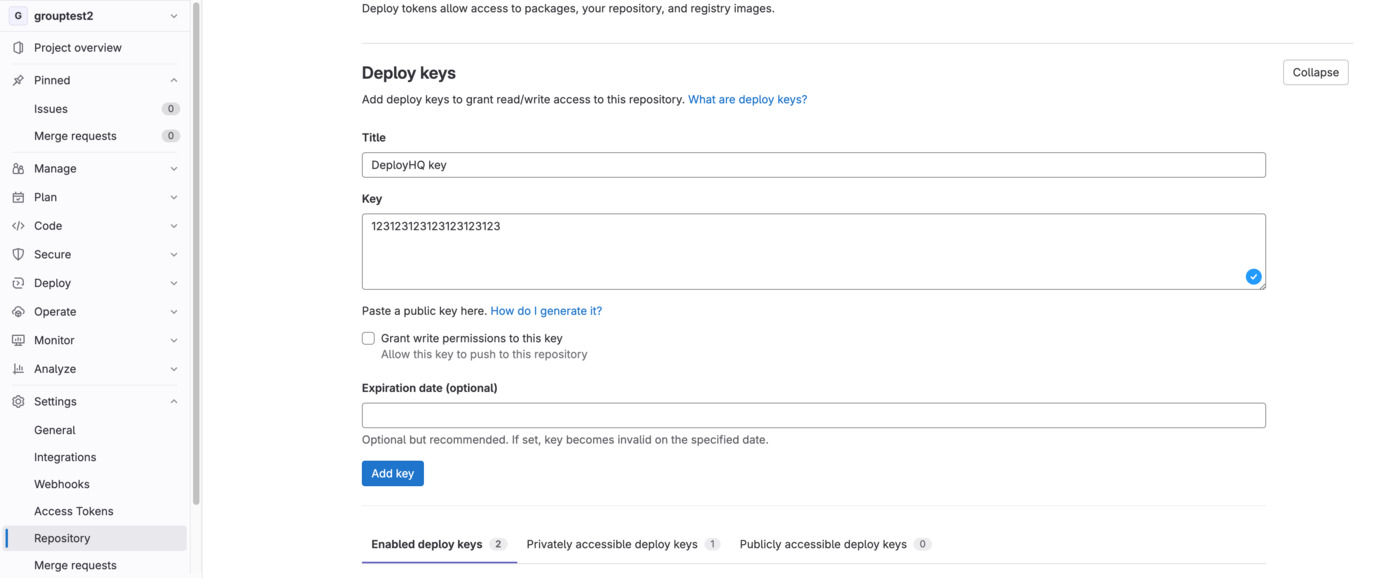
Deploy Keys in GitLab

Give the key a name, paste in your public key into the Key field, then click Add Key to save it, ensuring that write access is not enabled.

Getting Started

  • Introduction
  • FAQ Deployments 101
  • Account & Billing

Core Functionality

  • Projects
    • Creating a project
    • Updating repository details
      • Adding a new SSH key to Bitbucket
      • Adding a new SSH key to Codebase
      • Adding a new SSH key to GitHub
      • Adding a new SSH key to GitLab
    • Environment variables
    • Deleting a project
    • Recache your repository
    • Uploading a custom key pair
    • Undeployed Changes
  • Servers
  • Deployments
  • Users

Configuration

  • Config Files
  • SSH Commands
  • Build Pipelines
  • Excluded Files
  • Templates
  • Network Agents
  • Public Framework Templates
  • Integrations
  • Notifications
  • Global SSH Keys

Troubleshooting

  • Build Errors
  • Deployment Errors
  • FAQ
  • Network Agent errors
  • Repository Errors
  • Server Errors
  • Zero-downtime deployment issues
  • DeployHQ's AI helper
  • AI PageSpeed

Developer

  • Feature Request and Changelog Tool
  • API Documentation
  • Command Line Tool
  • DeployHQ scripting
  • MCP Server
DeployHQ

Deploy faster with confidence. From idea to production in minutes.

All systems operational
GitHub X LinkedIn Bluesky

Product

Features Pricing Testimonials Documentation API Reference Integrations

Resources

Blog Support Center Guides and tutorials Status Page Changelog Learn Git AI PageSpeed DeployHQ AI DeployHQ MCP Server

Solutions

Deploy from GitHub Deploy from GitLab Deploy from Bitbucket Deploy from Slack WordPress Deployments Shopify Apps Zero Downtime Turbo Deployments Build Pipelines

Company

Careers Contact Terms of Service Privacy Policy Cookie Policy

Integrations

GitHub GitHub GitLab GitLab Bitbucket Bitbucket
View all integrations Request integration
Back to top

© 2025 DeployHQ (saas.group LLC). All rights reserved.

Proudly powered by Katapult . Running on 100% renewable energy. Tree