

AI Error Explanation
DeployHQ's AI-powered troubleshooting features help you quickly understand and resolve deployment failures. When a deployment step fails, our AI assistant analyzes error logs and provides actionable guidance to get your deployment back on track.
What is AI Error Explanation?
The AI Error Explanation feature uses advanced AI to analyze failed deployment steps and provide instant troubleshooting guidance. Instead of manually parsing through error logs to understand what went wrong, the AI does the heavy lifting for you, delivering:
- Error summary: A clear, human-readable explanation of what went wrong
- Recommended fixes: Actionable steps to resolve the issue
- Resolution guidance: Additional context to help you understand the problem and prevent it in the future
Supported Deployment Steps
The AI assistant can analyze errors from the following deployment step types:
- Build command failures: Issues during npm install, composer install, or other build processes
- SSH command execution issues: Problems running custom commands on your server
- Before/After changes commands: Errors in pre or post-deployment scripts
- Before symlink commands: Issues during the symlink preparation phase
- Shell commands: General shell command execution failures
Note: The AI explanation feature is currently available for command-based deployment steps where error logs are available.
How to Use AI Error Explanations
Step 1: Locate the Failed Deployment Step
When a deployment fails, navigate to the deployment details page. Failed steps are clearly marked with a red error indicator.
Step 2: Access the AI Explanation
On the failed deployment step, click the "AI Explanation" or "Explain Error" button. This button appears on any command step that has failed with error logs.
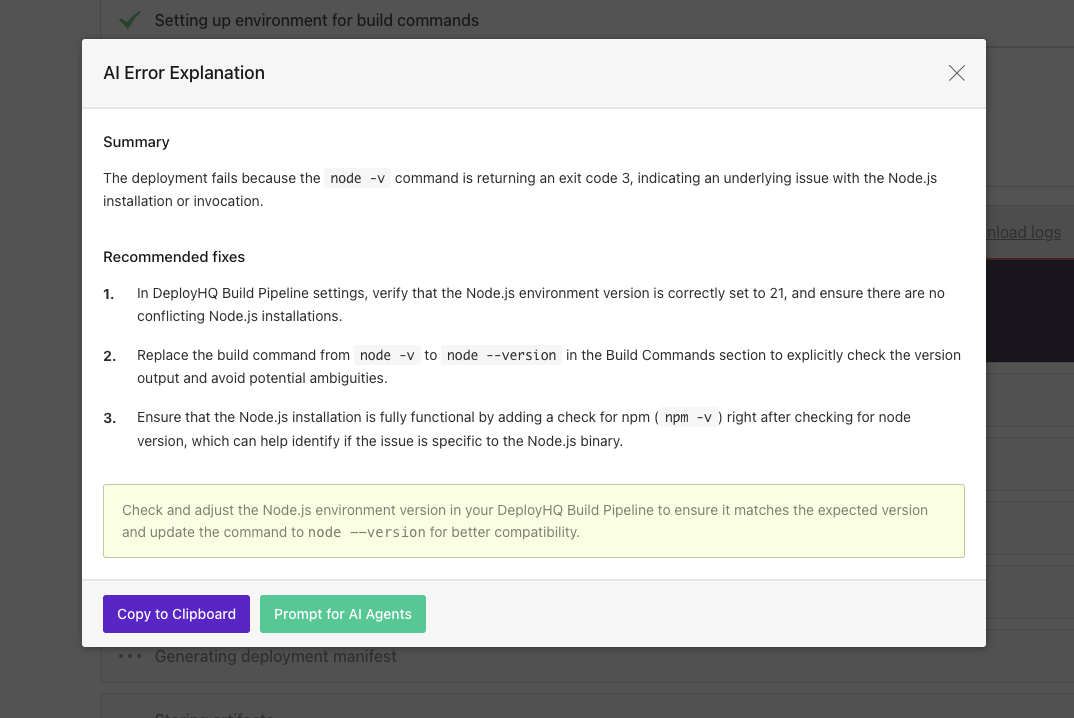
Step 3: Review the Analysis
The AI will analyze the error logs and present a dialog with:
- Summary: A concise explanation of the root cause
- Recommended fixes: A numbered list of potential solutions, ordered by likelihood of success
- Resolution guidance: Additional tips and context to help you understand and fix the issue
The analysis typically completes in just a few seconds, even for complex error logs.
How It Works
Behind the scenes, the AI Error Explanation feature:
- Collects error logs: Gathers command output and error messages from the failed step
- Includes context: Adds relevant deployment context like build environment settings and command configuration
- Analyzes patterns: Uses AI to identify error patterns and root causes
- Deduplicates errors: Groups similar errors together to reduce noise in the analysis
- Generates guidance: Creates actionable recommendations based on the error type and context
- Caches results: Stores analysis for similar errors to provide faster responses
Smart Error Processing
The AI system includes intelligent error processing:
- Log deduplication: Similar errors are grouped together with occurrence counts
- Token optimization: Large log files are intelligently truncated while preserving critical error information
- Build context: For build failures, the AI receives information about your build environment versions and commands
- Error normalization: Deployment-specific details like timestamps and paths are normalized to identify similar error patterns
Getting Implementation Help with AI Agents
After viewing the error explanation, you can take it further by using the Prompt for AI Agents button. This feature creates a comprehensive prompt that you can paste into your preferred AI coding assistant.
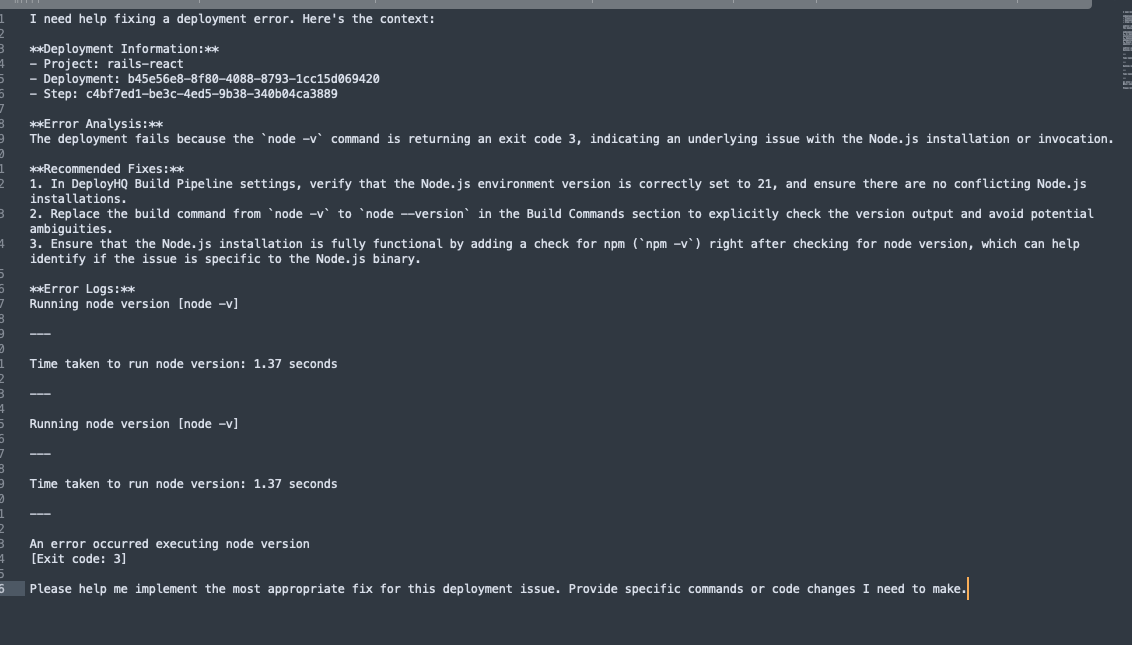
What's Included in the Prompt
The generated prompt includes:
- Deployment information: Project name, deployment ID, and step identifier
- Error analysis: The complete AI-generated summary and recommended fixes
- Error logs: Relevant error logs for detailed analysis
- Implementation request: A clear request for specific code changes or commands to fix the issue
Compatible AI Tools
You can paste the generated prompt into any AI coding assistant, including:
- Claude (Anthropic)
- ChatGPT (OpenAI)
- GitHub Copilot Chat
- Cursor
- Codeium
- Any other AI assistant that accepts text prompts
This workflow is particularly powerful because it combines DeployHQ's deployment-specific context with your AI assistant's ability to generate specific code changes and commands tailored to your project.
Example Use Cases
Build Failure: Missing Dependencies
Error: Build command fails with "Cannot find module 'xyz'"
AI Analysis:
- Identifies the missing package
- Checks if it's listed in package.json
- Recommends adding the dependency or fixing version conflicts
- Suggests running npm install locally to test
SSH Command Failure: Permission Denied
Error: SSH command fails with permission errors
AI Analysis:
- Identifies the file or directory causing the issue
- Recommends checking file permissions with ls -la
- Suggests chmod commands to fix permissions
- Explains the deployment user's access requirements
Build Command: Compilation Error
Error: TypeScript or Sass compilation fails
AI Analysis:
- Pinpoints the file and line number with the error
- Explains the syntax or type error
- Recommends specific code fixes
- Suggests related configuration changes if needed
Best Practices
When to Use AI Explanations
- First-time errors: When you encounter an unfamiliar error message
- Complex logs: When error logs are long or contain multiple issues
- Time pressure: When you need to resolve deployment issues quickly
- Learning: When you want to understand why something failed
Getting the Most from AI Analysis
- Read the full summary: Don't just jump to the fixes; understanding the root cause helps prevent future issues
- Try fixes in order: The recommended fixes are ordered by likelihood, so start with the first one
- Use the AI Agent prompt: For complex fixes, use the generated prompt with your coding assistant
- Check build environment: For build failures, verify your build environment versions match your local setup
When to Seek Additional Help
While the AI explanation is powerful, you may need additional support if:
- The recommended fixes don't resolve the issue
- The error is related to server configuration or infrastructure
- You need help implementing the recommended changes
- The issue involves third-party service integration
In these cases, our support team is available to help. Contact us through the support page.
Download Logs for Reference
You can also download the complete deployment logs for your records or to share with your team. This is particularly helpful when:
- Dealing with complex issues that require additional investigation
- Sharing error details with your development team
- Comparing errors across multiple deployments
- Creating bug reports for external dependencies
Privacy and Data Handling
The AI Error Explanation feature prioritizes your privacy:
- Secure processing: Error logs are processed securely and not stored permanently
- Smart caching: Similar errors are cached to improve response time, but caches expire after one hour
- No sensitive data: The AI is designed to analyze error patterns, not extract sensitive information from logs
- Normalized data: Deployment-specific details like paths and timestamps are normalized before analysis
Feedback and Support
If you notice any issues with the AI explanations or have suggestions for improvement, please contact our support team. Your feedback helps us improve the AI's accuracy and usefulness for everyone.